01
Capture
Writes the entry, extracts the actions, links everything, rewrites where the project now stands.
The filing happens without you. Put it on a schedule and it sweeps your inbox, distils your calls, reads your calendar and email, reconciles your to-do list and hands you the day. The one thing it cannot get anywhere else is why you decided something. That part takes a sentence.
Client and contact names blurred. Everything else is exactly as it sits, five months in.
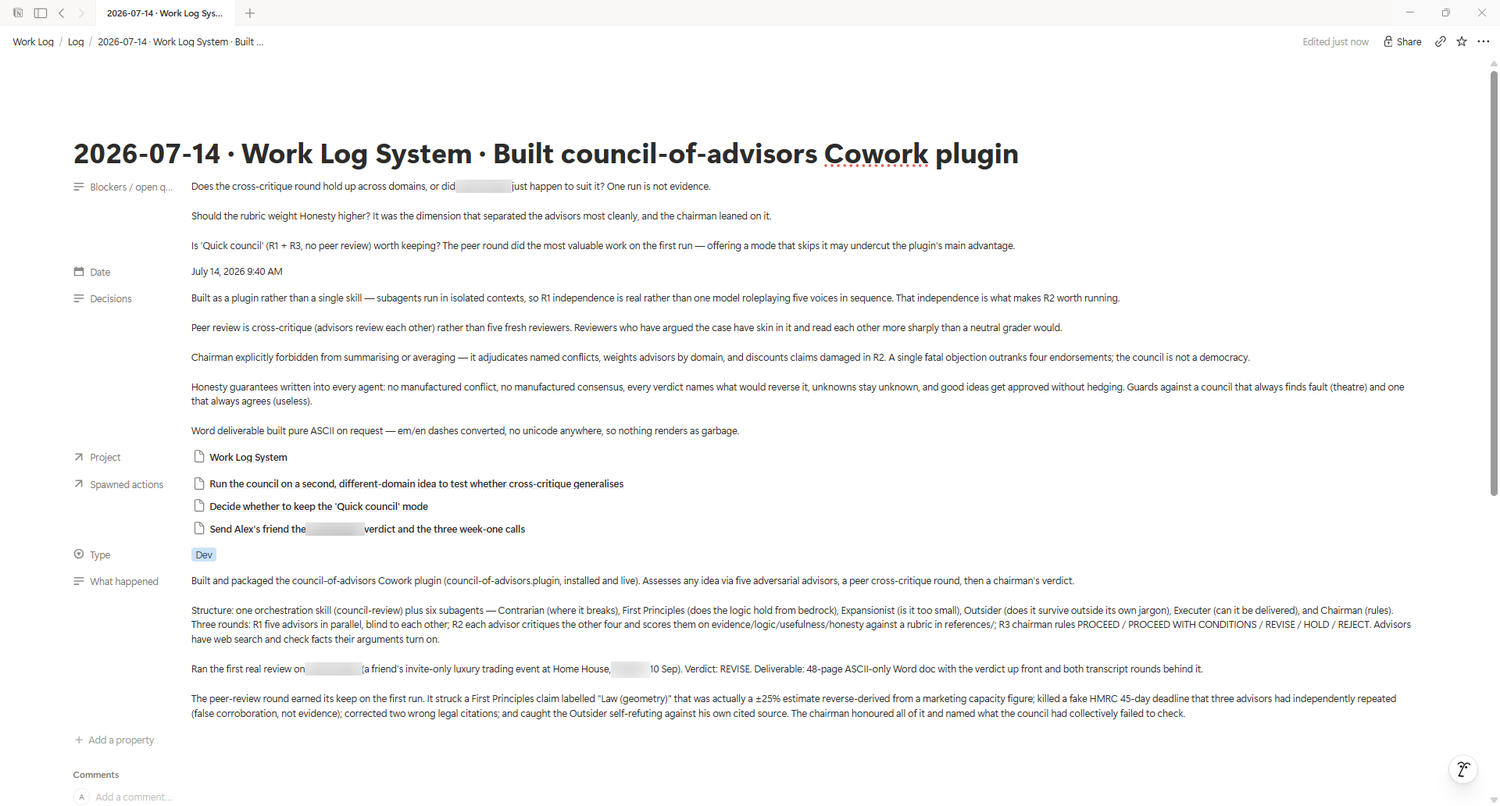
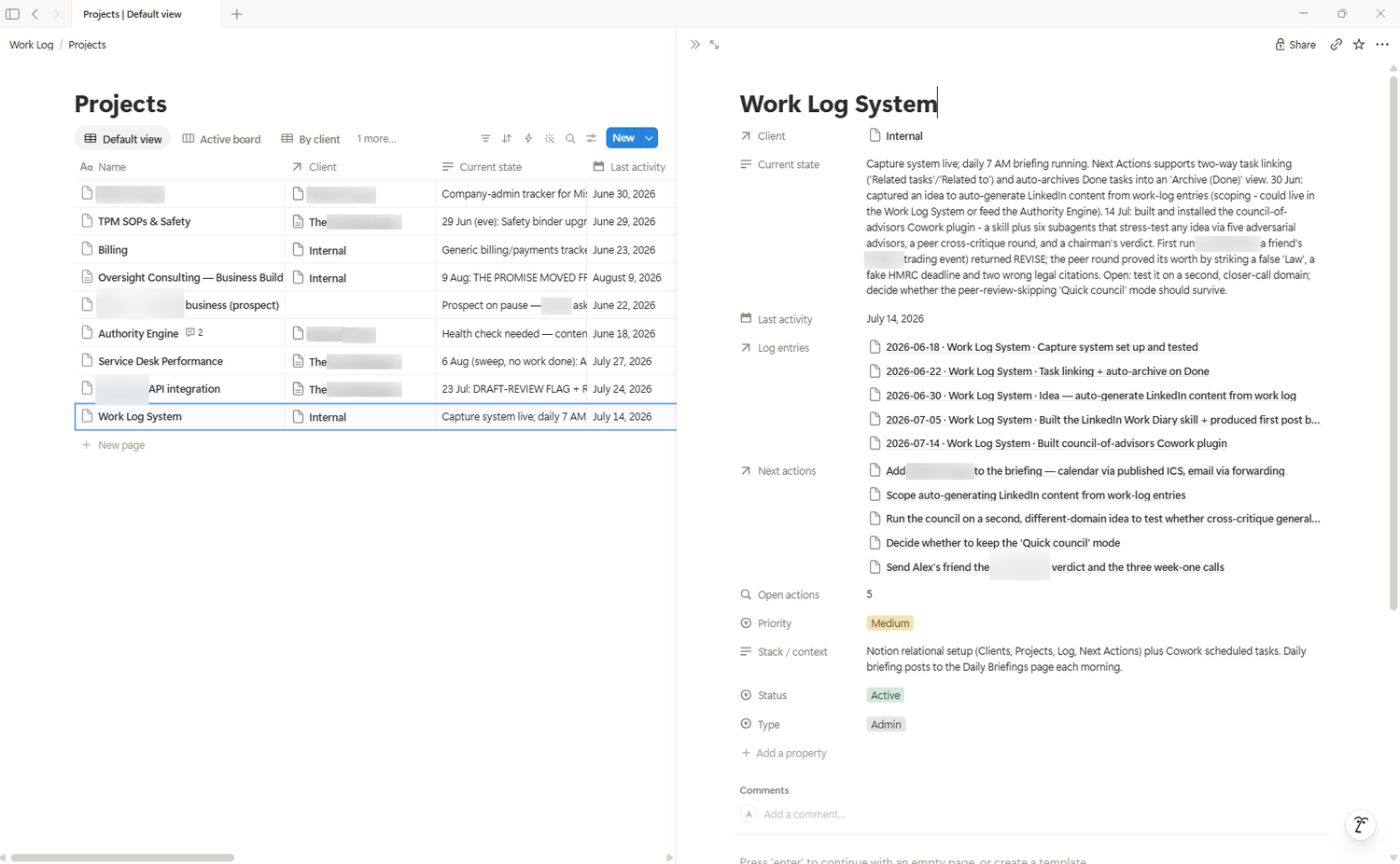
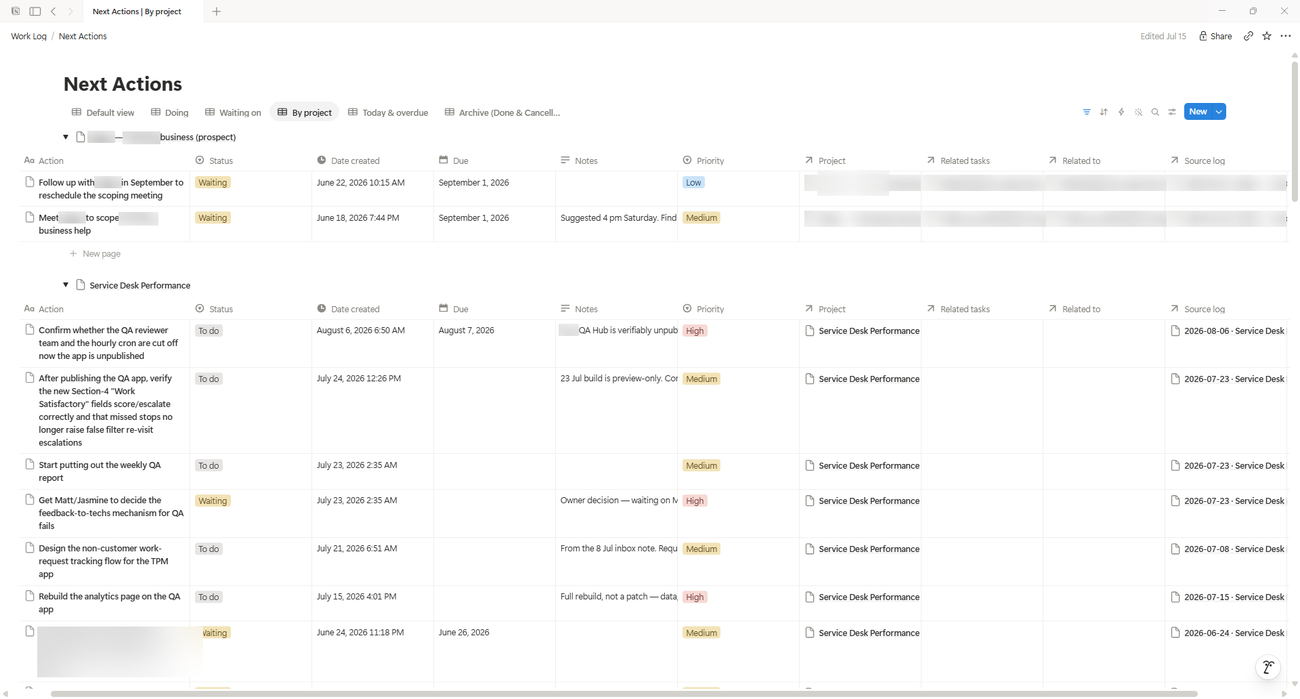
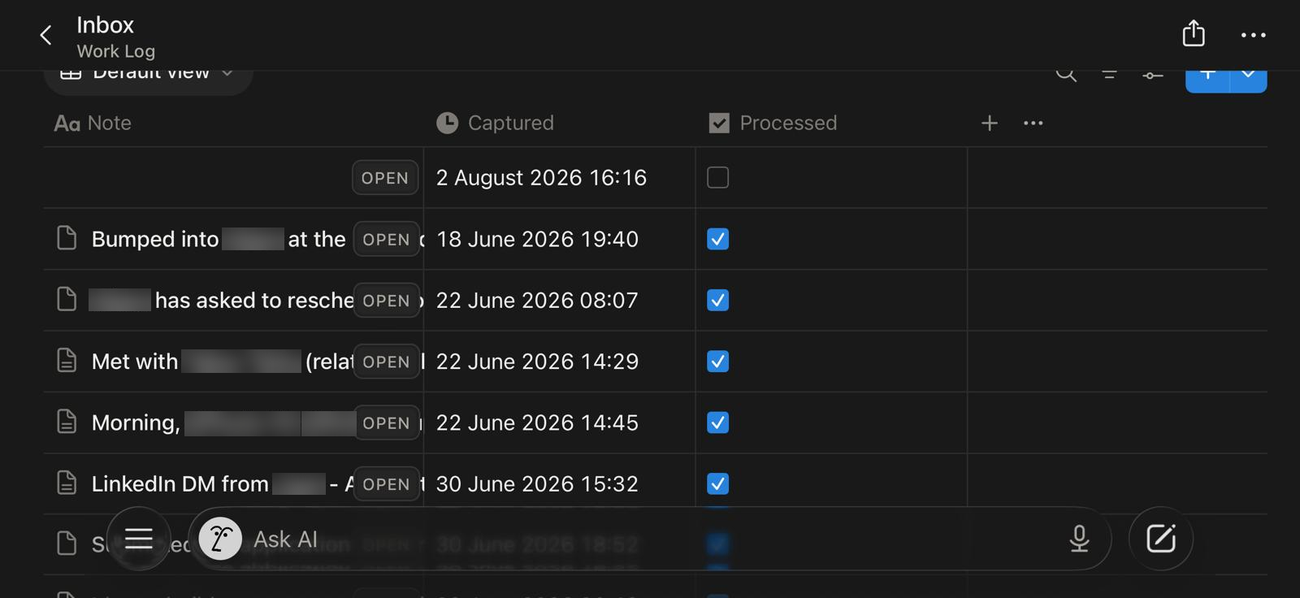
Project admin fails the same way every time. Capture costs more than it returns, so you stop doing it. Then the weekly review has nothing to review, and the to-do list drifts out of date until you no longer trust it.
The fix is not more discipline. It is removing the cost at the point of capture, which is the only place it matters. You talk for fifteen seconds. The system does the filing, the linking and the list.
Once the schedule is set, the log maintains itself off what you already produce. Below is a normal weekday of mine. Note how little of it is me.
The scheduled runs handle everything with a trace. This is the other case: something only you know, said badly, once. Left is what you say. Right is what lands in Notion.
just came off the acme call, they want the pilot pushed to september. agreed we cut scope rather than move the date twice, because moving it twice kills their trust in us. need to redo the SOW by wednesday and i'm waiting on sarah for the revised headcount
Talking to it is the entry point, not the requirement. Connect the rest and most of the day files itself from things you already produce.
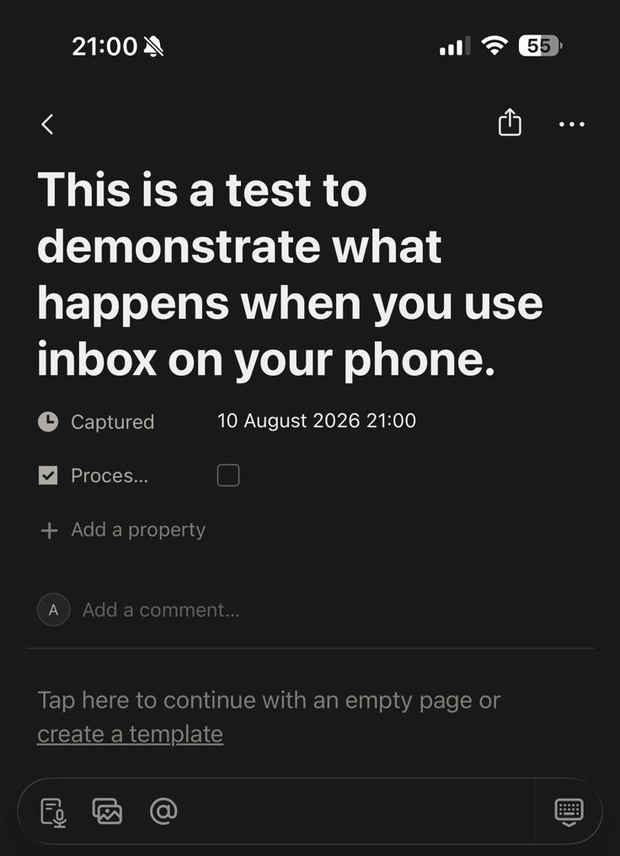
Typed or dictated, in chat or into the Notion Inbox on your phone. Unstructured, unedited, mid-sentence.
Today's meetings and the real gaps between them. Google or Outlook.
Triaged, not just listed. What is genuinely waiting on you, and what landed since yesterday.
Auto-transcribed calls distilled, not pasted. Commitments pulled from both sides of the call.
What happened, what you decided and why, what is still unresolved.
Built from the record, not typed separately. Every task linked to its source.
Three to five tasks that fit the time your calendar actually leaves you.
By client. Stale projects flagged. Overdue listed. Everything you are waiting on.
The five databases are the spine. Anything Claude can reach becomes another input, and the daily brief absorbs it. This is what mine reads on top of the core.
Site traffic and enquiry volume, read each morning, so a quiet week is something you notice on Tuesday rather than in a month.
Runs on a timer without being asked. Inbox swept, brief rendered, review prompted, whether or not you remember.
Slack or Teams. Mentions and DMs still open on you, surfaced next to everything else instead of in a separate tab.
Your CRM, your job software, your docs. If there is a connector, it becomes an input. Nothing in the schema has to change.
To be clear about what you are downloading: the pack contains the work-log skill and the Notion structure. The extras above are separate connectors you enable in Claude, and a second skill for the daily brief. Setup is per connector and takes minutes, but it is not one click.
Writes the entry, extracts the actions, links everything, rewrites where the project now stands.
Reads the calendar, sees the real gaps, hands you a shortlist that fits. Not a backlog.
Summarises the day, flags what you mentioned but never turned into a task, sets tomorrow's three.
Rollup by client. Stale projects. Overdue actions. Everything sitting with someone else.
Phone captures get filed into proper entries and ticked off. Say "process my inbox" and walk away.
Reads the full call, writes a short entry, links back to the transcript. Never pastes the whole thing.
Closes tasks only on evidence from the log. Flags obsolete ones instead of quietly marking them done.
No API keys. No scripts. No terminal on Desktop or Cowork. Claude Code users get one command, and only because they asked for it.
Steps one and six are the only parts with real work in them, and you can hand step one to Claude. If you would rather not do it alone, I will sit on a call and set it up with you, free.
Settings, then Connectors, then Notion. In Claude Code, add the Notion MCP server and run /mcp to confirm. Make sure the Work Log page sits inside the shared scope.
Test it: ask Claude to search your Notion for a database called Next Actions. If it finds it, you are connected.
Create an empty Notion page called Work Log. Then paste the prompt below and Claude builds all five databases to spec. Or skip the prompt entirely: duplicate the ready-made Notion template, which is the more reliable route if you would rather not check an LLM's work.
Build my work-log system inside my Notion page called "Work Log".
Create five databases as full pages inside it, exactly to this spec.

Clients - Name (title), Type (select: Client, Internal), Status
(select: Active, Dormant, Archived), Primary contact (text), Context (text).

Projects - Name (title), Client (relation to Clients), Status (select:
Active, On hold, Blocked, Done), Type (select: Client work, Own product,
Admin), Priority (select: High, Medium, Low), Current state (text),
Stack / context (text), Last activity (date).

Log - Entry (title), Date (date with time), Project (relation to
Projects), Type (select: Dev, Meeting, Call, Planning, Research, Admin),
What happened (text), Decisions (text), Blockers / open questions (text).

Next Actions - Action (title), Project (relation to Projects), Source
log (relation to Log), Status (select: To do, Doing, Waiting, Done,
Cancelled), Priority (select: High, Medium, Low), Due (date), Notes (text).

Inbox - Note (title), Captured (created time), Processed (checkbox).

All text fields are Notion "Rich text". The Log "Date" must have Include
time switched on.

Create the relations in both directions and name the reverse sides exactly:
Clients "Projects", Projects "Log entries", Projects "Next actions",
Log "Spawned actions".

On Projects, add a rollup called "Open actions": relation Next actions,
property Status, calculate Count, filtered to Status is not Done and is
not Cancelled.

Then create one Client called "Internal" with Type = Internal, Status =
Active. List every property you created so I can check it. Tell me when
it is done.
Duplicate the Notion template · or build by hand from the schema. Whichever route you take, check the result against the schema. Notion names reverse relations its own way, so rename any that do not match.
Upload work-log.skill where your Claude surface accepts skill files, or paste SKILL.md into a new skill.
cp -r skill/work-log ~/.claude/skills/work-log
Restart Claude afterwards. Skills load at startup.
Optional, but the system is far better with them. In Next Actions: "Today and overdue". In Projects: "Stale", filtered to Status is Active and Last activity before one week ago.
That second view is the one that catches work quietly slipping.
Say this. You should get a log entry, one task, and a project created or matched.
Log this. Spent an hour setting up my work log system. Decided to
use Notion rather than a spreadsheet because I want the relational
links. Need to test the daily close-out tomorrow.
This is the step that turns it from a tool into a system. In Cowork: sidebar, Scheduled, New task, Set up manually. Paste the prompt, set the frequency, save.
Where the output lands. Each run appears as its own session in your Scheduled list, and you open it to read the brief. Turn on notifications for the task if you would rather be told it has finished than remember to look.
Check the clock. Set the time in the scheduler and confirm which timezone it uses before you trust a 06:30. An hour out either way makes a morning brief useless.
Which surface. Scheduling lives in Cowork. Claude Code has its own separate scheduling, set up differently. If you are on Desktop without either, run the three prompts by hand and you lose nothing but the timer.
The pack contains all three prompts in SCHEDULING.md. Start with the morning sweep alone. Add the other two once you trust what it files.
Run my morning work-log sweep. Use the work-log skill. Work through
these in order and do not stop to ask me anything.

1. Process my Notion quick-capture Inbox. File every unprocessed note
   into a Log entry against the right project, extract any next actions,
   and tick Processed. If a note is too vague to place confidently, leave
   it unprocessed and list it for me at the end.
2. Process any call transcripts I have not logged yet. Distil each into a
   Log entry, pull out the commitments on both sides, link back to the
   transcript, and mark it logged.
3. Reconcile my open Next Actions against the last 10 days of Log
   entries. Close only those the log clearly proves are done. Never close
   on the due date alone. Flag anything obsolete rather than closing it.
4. Read today's calendar and my email. Identify what is genuinely waiting
   on a reply from me.
5. Give me a short brief: the shape of today, three to five actions that
   realistically fit the gaps between my meetings, anything overdue,
   anything I am waiting on someone else for, and anything you could not
   file. Keep it tight.
One thing that catches people out: every scheduled run is a fresh session. It remembers nothing from your chats or its own last run. That is why the prompt repeats context you would never type in conversation. Keep that habit when you write your own.
Twenty minutes on a call. We build the databases, connect it, and run your first real capture together so you leave with something working rather than something downloaded.
There is no upsell at the end. I am giving this away because I want to see what people do with it, and because the variants people build are more interesting than mine.
No recording. No follow-up sequence.
Once a month, on automation and VAs, and why they work. Every issue comes with a new free resource. You never need the list to get them. Everything here stays free and ungated. The newsletter is just how you hear about the next one.
Five databases in one parent page. Property names are load-bearing: the skill searches by name, so rename in both places or not at all.
Create one entry immediately called Internal, Type set to Internal. Your own products and your own admin point at it. Without it, personal projects have nowhere to live.
| Property | Type | Options |
|---|---|---|
| Name | Title | |
| Type | Select | Client, Internal |
| Status | Select | Active, Dormant, Archived |
| Primary contact | Rich text | |
| Context | Rich text | |
| Projects | Relation | to Projects. Reverse side of the Client relation, name it exactly this. |
These names are yours to change. Type and Stack / context are what suit my work; rename them to whatever your week actually looks like. Change them in the skill file too and nothing breaks. Current state earns its keep. One line, rewritten every time you log. It is what you read coming back to a project after two weeks, when you cannot remember where you left it.
| Property | Type | Options |
|---|---|---|
| Name | Title | |
| Client | Relation | to Clients |
| Status | Select | Active, On hold, Blocked, Done |
| Type | Select | Client work, Own product, Admin |
| Priority | Select | High, Medium, Low |
| Current state | Rich text | One line, kept fresh |
| Stack / context | Rich text | |
| Last activity | Date | |
| Log entries | Relation | to Log. Name the reverse side exactly this. |
| Next actions | Relation | to Next Actions. Name the reverse side exactly this. |
| Open actions | Rollup | Next actions → Status → Count, filtered to not Done and not Cancelled |
Decisions is the highest-value field in the system. Not what you did, but what you chose and why. Six months out it is the only part you actually need. Titles follow YYYY-MM-DD · Project · short description.
| Property | Type | Options |
|---|---|---|
| Entry | Title | |
| Date | Date | Include time |
| Project | Relation | to Projects |
| Type | Select | Dev, Meeting, Call, Planning, Research, Admin |
| What happened | Rich text | |
| Decisions | Rich text | The choice and the reasoning |
| Blockers / open questions | Rich text | Phrased as questions |
| Spawned actions | Relation | to Next Actions. Name the reverse side exactly this. |
This is your to-do list, and you never type into it directly. Waiting is not decoration: it is for work sitting with someone else, and the weekly review surfaces it so you chase it.
| Property | Type | Options |
|---|---|---|
| Action | Title | Verb first, physically actionable |
| Project | Relation | to Projects |
| Source log | Relation | to Log |
| Status | Select | To do, Doing, Waiting, Done, Cancelled |
| Priority | Select | High, Medium, Low |
| Due | Date | |
| Notes | Rich text |
Deliberately minimal. Three fields, so capture from a phone takes seconds. Put the Notion widget on your home screen and dictate a one-liner. Name the project inline if you can.
| Property | Type | Options |
|---|---|---|
| Note | Title | The raw one-liner |
| Captured | Created time | Automatic |
| Processed | Checkbox | Ticked by the skill |
You do not need to memorise commands. Just talk. But these are the ones you will use every day.
| Say this | You get |
|---|---|
| Just describe what you did | A filed entry, tasks extracted, project state rewritten |
| Plan my day | Three to five tasks that fit your real calendar gaps |
| Close out my day | Today summarised, loose ends flagged, tomorrow's top three |
| Process my inbox | Every phone capture filed and ticked off |
| Process my call transcripts | Meetings distilled, commitments pulled from both sides |
| Weekly review | By client. Stale, overdue, waiting-on. |
| What am I waiting on? | Everything sitting with someone else, ready to chase |
log this explicitly for the first few captures. A direct instruction always works.Almost always connector scope. The Notion connector only sees pages explicitly shared with it. Open your Work Log page and confirm the connection is granted there or at a parent above it.
Test with: "Search my Notion for a database called Next Actions."
Yes. Capture, the to-do list, close-out and the weekly review all run on your voice input alone. Calendar powers "plan my day". Transcripts remove the need to dictate after calls. Both are additive.
Not to start. Skills are available on every Claude tier including Free, and Notion is a directory connector, which is open to all users. Notion's free plan handles the databases, relations and rollups without complaint.
Not to run it. Every routine works on demand with a sentence, on a free account. Paid tiers add scheduling, so it happens without you asking, and more headroom for the bigger sweeps. Try it by hand first and decide from there.
Your records live in your Notion, in your account. Nothing is stored by me and there is no server of mine anywhere in this. Claude reads and writes to Notion through the connector you authorise, and you can revoke that at any time.
Worth being straight about the rest: whatever you connect, Claude processes. That includes email contents and call transcripts if you connect those. Check Anthropic's and Notion's current data policies yourself rather than taking my word, and check your own client agreements before you point it at transcripts of client calls. Some contracts have views on that.
If in doubt, run it with the Notion databases only. The core system never needs your email.
It creates and updates. It is not asked to delete, and the prompts tell it to flag rather than remove anything that looks obsolete. The realistic failure is a misfiled entry or a project state rewritten less well than you would have, both of which you can just edit.
Notion keeps page history, so an overwrite is recoverable. If you would rather check before it writes, set the scheduled tasks to require approval for the first fortnight.
The structure is fine for it. Share the parent page and a colleague can capture into the same log, and the weekly review then covers both of you. Notion's free plan limits guests, so a second regular user is where you would start paying Notion rather than Claude. It was built single-user, so treat two-person use as something to test rather than assume.
It replaces the task app, not the software you run your business on. Next Actions is a to-do list that happens to be generated rather than typed, so running it alongside Todoist or Asana means maintaining two lists and trusting neither.
Your CRM, job software or project tracker stays exactly where it is. This sits on top and reads from it if there is a connector.
Week one is setup and getting into the habit. The first real payoff is the first weekly review, because that is the first time it tells you something you did not already know. The Decisions field takes a few months to start earning, and then it does not stop.
It opens a fresh session, works through the prompt, writes to Notion and reports back. It runs remotely, so your machine can be shut.
Two consequences worth knowing. It remembers nothing between runs, so the prompt has to stand alone. And nobody is there to answer questions, so the prompts tell it to leave anything ambiguous unfiled and list it for you rather than guess.
If you would rather check its work before it writes, set the task to require approval for the first couple of weeks.
The prompts are written to stop it padding, and in daily use it does not. If you capture nothing and take no calls, the close-out has nothing to summarise and says so. Read the first week's output properly anyway. Automation removes the admin, not the doing.
The Notion structure is tool-agnostic and worth building on its own. The skill is plain markdown describing a workflow, so it adapts with modest editing. Nothing is locked.
Please do. Fork it, rename it, strip out what you do not use. If it saves you an hour a week, tell me what you changed. The variants are the interesting part.
The skill file, the three scheduled-task prompts, the setup guide, the schema spec, the prompt sheet and the troubleshooting notes. No email needed to download it, and no sequence afterwards.
Eight files · 38 KB unzipped · Claude Desktop, Cowork and Claude Code
Paste it into a new skill in Claude. You will still want the setup steps above for the Notion side.
The record is the asset. Both of these run on the same five databases and the same scheduled sweep, with no extra input from you.